Sant Tabs
A Chrome extension we built for ourselves, then put on the Chrome Web Store. Three views, fuzzy search, a two-tier sort that pairs a local rules engine with a Gemini fallback, and a shortcut for every action.

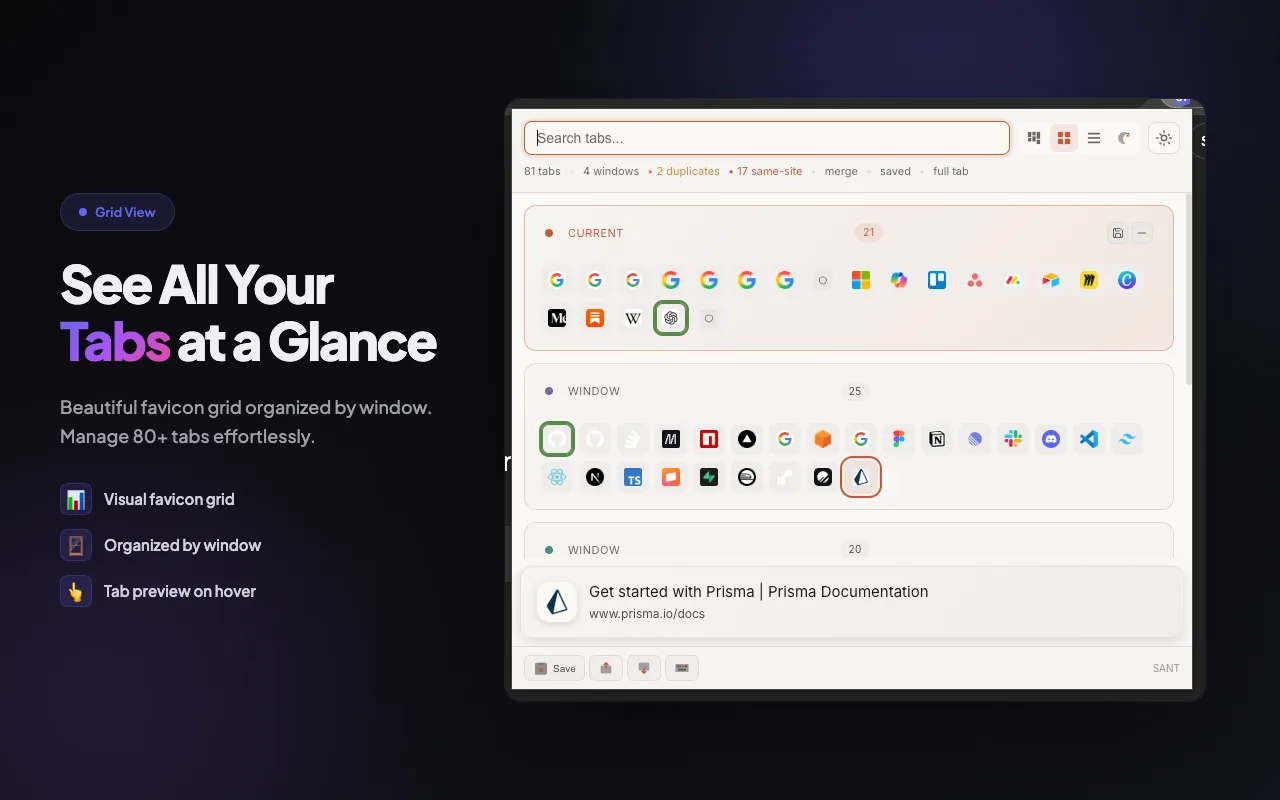
What we built
A Chrome extension on Manifest V3 with three view modes, a side panel, omnibox keyword tc, and a keyboard map that covers every action in the product.
Underneath: a 200-rule local categorisation engine for instant sort, a Firebase Cloud Function calling Gemini 2.0 Flash for the long tail, Firestore for optional cloud sync, and Google OAuth via Chrome's native identity API. Every feature ships to every install, no tier gates.
Why we built it
The first version was for me. A multi-monitor day at Sant means dozens of tabs open across several Chrome windows, and the existing managers were either too casual, too mouse-heavy, or too eager to track the user. The product needed an alternative built for builders.
Sant Tabs is what I wanted to use. Open with a shortcut, type to search across everything, arrow to the result, hit enter. Single-letter navigation for views, themes, and settings. The mouse exists only for drag-and-drop. We then put it on the Chrome Web Store at no cost because friction breaks tools that are supposed to live in the flow.
Three views
Map for the birds-eye, grid for the daily, list for the keyboard.
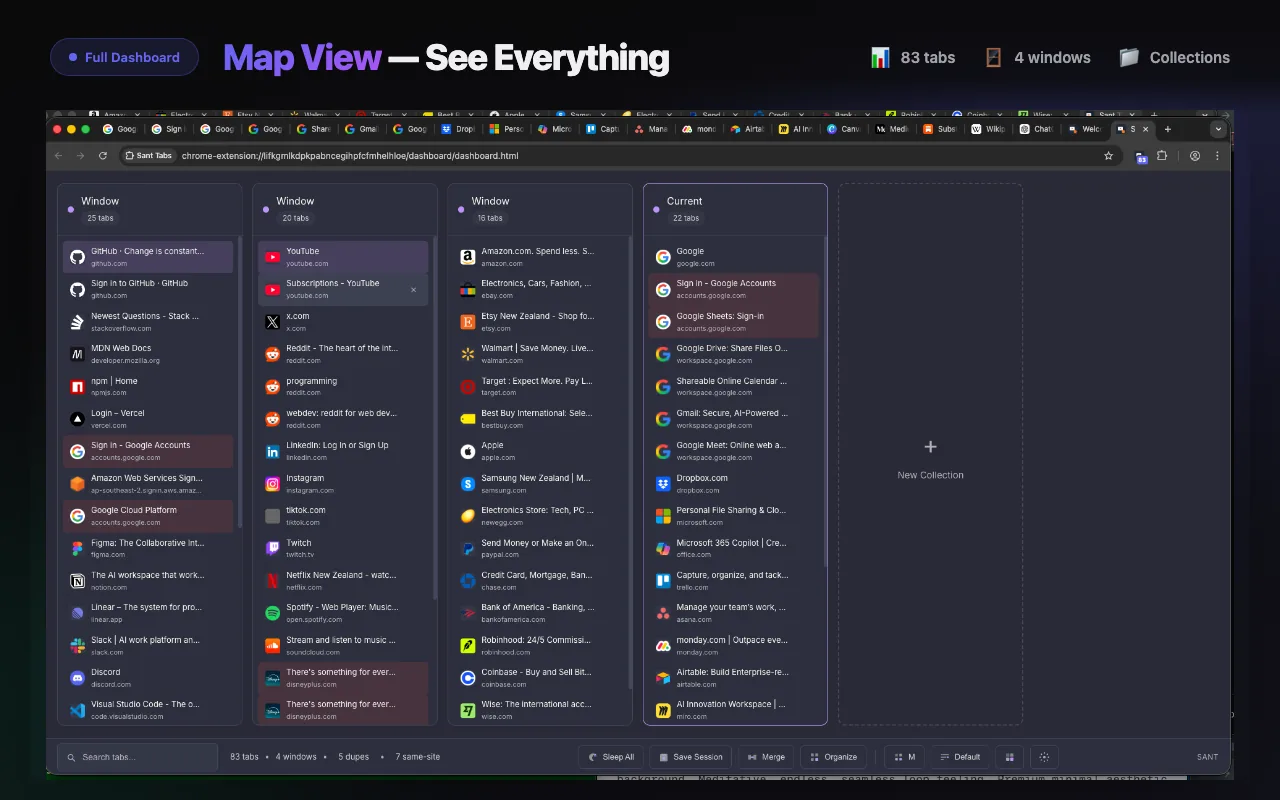
Every tab, at once
Birds-eye grid that shows every tab across every window in a single screen. Built for the moment when a window has eighty tabs and a list view is no longer useful.
The daily driver
Card-based grouping by category. Density without losing readability. Drag and drop between groups, click to switch, keyboard to fly through.
The keyboard default
A single scrollable column. Up, down, enter. Backspace closes. The fastest path when the goal is “find one and switch to it.”
Keyboard-first
Every action has a single-letter shortcut.
Sant Tabs is faster than reaching for the mouse. Switching views, cycling themes, opening settings, even closing a tab. One key, one action.
The sort
Rules first. AI for the long tail.
Letting an AI categorise every tab is slow and expensive at scale. So Sant Tabs sorts in two tiers. A local rules engine handles the 95% of tabs that are obviously shopping, social, dev, productivity, AI, finance, news, or another well-known category. Anything the rules don't recognise gets shipped to a Firebase Cloud Function that calls Gemini 2.0 Flash for clustering.
200+ rules in milliseconds
Domain and keyword matches grouped into 20-odd categories. Runs entirely in the extension. No network call, no API key, no latency. The bulk of everyday tabs land in the right group before the user can blink.
Cloud Function clustering
Unknown URLs ship to a Firebase Cloud Function (clusterTabs) that calls Gemini 2.0 Flash. Flash is cheap enough to scale to a hundred-thousand installs without breaking the cost model. The function holds the API key so the extension never sees it.
Cloud sync
Sync is opt-in. The product runs end-to-end on a single machine without ever touching a server. Turn on cloud sync and Sant Tabs keeps your sessions, themes, and saved windows in Firestore, scoped to your Google account.
Auth uses Chrome's native identity API for OAuth. No password ever lives in the extension. Tokens are short-lived and revoke from your Google account in one click. The whole thing was reachable on every install without paywalls so the product would stay simple to recommend.
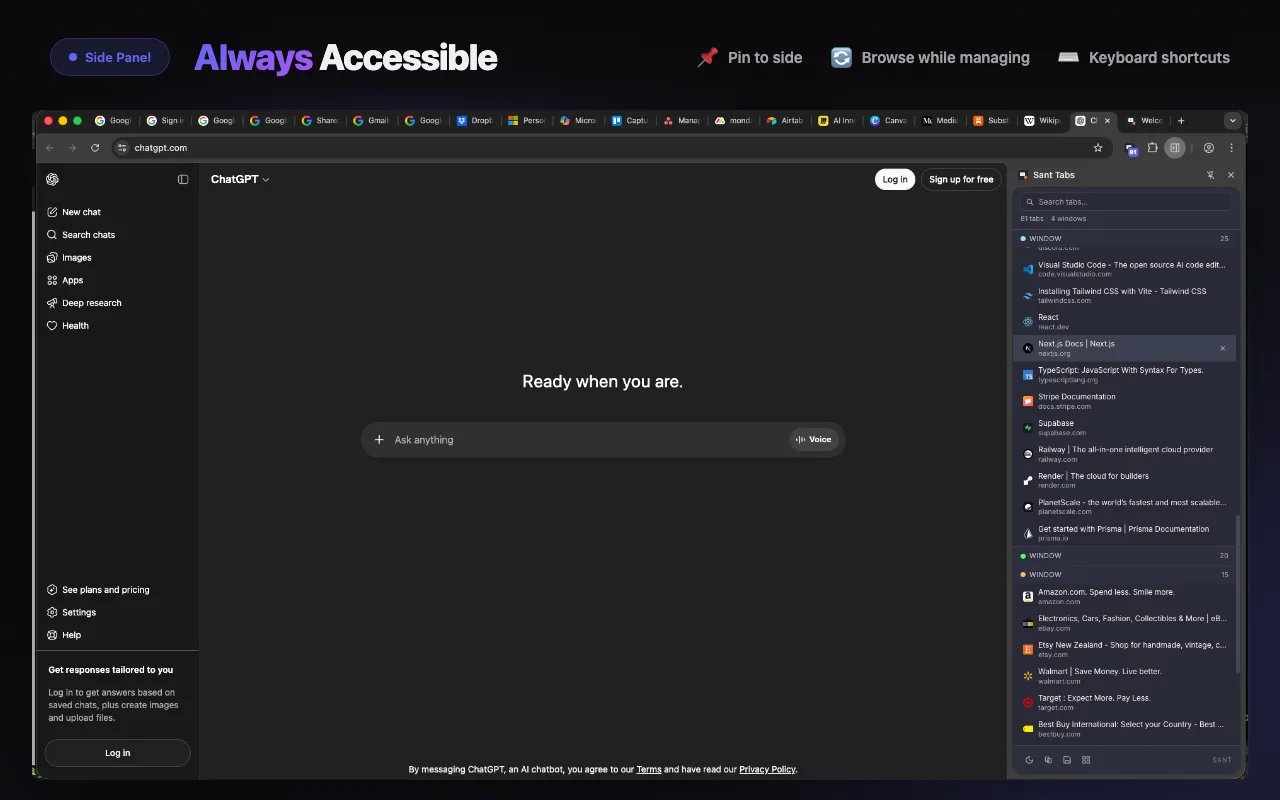
Side panel
Pinned to the side, persistent across tabs.
Sant Tabs runs in Chrome's side panel as well as full-page mode and the popup. Pin it open and the keyboard map is always one keystroke away, no matter which tab is in focus.
Themes
Seven themes, cycled with T.
The build
From a personal pain to tabs.onl.
Existing tab managers were not for builders
Most tools were slow to open, mouse-only, or quietly collecting telemetry. The product needed something that would treat the keyboard as the primary input and stay out of the way the rest of the time.
A popup with fuzzy search and arrow keys
The MVP did one thing: open with a shortcut, search across every tab, arrow to it, hit enter. That alone replaced half the muscle memory. The rest of the product grew from there.
Map, grid, and list
Once windows pile up, a list scrolls forever. Map view shows everything at once as a heat-mapped grid by domain. Grid view balances density with readability. List view is the default for fast keyboard navigation.
Local categorisation backed by a Gemini fallback
200+ domain rules categorise the obvious tabs in milliseconds, no network needed. The unknowns ship to a Firebase Cloud Function calling Gemini 2.0 Flash. The split keeps the product instant for 95% of cases and intelligent for the rest.
Optional, OAuth via Chrome identity
Firebase Firestore for sync, Google OAuth via Chrome's native identity API. No password ever touches the extension. The free tier without sync still does everything except follow you across machines.
Tabs.onl, on the Chrome Web Store
Listed on the Chrome Web Store with cloud sync and AI organise turned on for everyone. Built and shipped end-to-end from our Sant studio in Christchurch, NZ.
What we learned
Build for one user well, the rest follow.
I built Sant Tabs because I needed it. Every shortcut, every default, every theme reflects how I actually work. That specificity is the product. Tools built to please everyone end up serving no one.
Speed beats intelligence on the common case.
Letting AI handle every categorisation is slow and expensive. A static rules engine handles 95% of tabs in the time it takes the AI to answer. Gemini Flash only sees the leftovers. Speed is a feature.
Keyboard-first is a real product principle, not a flag.
Every action has a single-letter shortcut. The product is faster than reaching for the mouse. That's the whole pitch and it's what tab management was missing.
Distribution is a design decision.
Putting Sant Tabs on the Chrome Web Store with no paywall meant fewer barriers to adoption and faster word-of-mouth. The product is small enough that gating features would have done more harm than the revenue could have offset.
Listed on the Chrome Web Store with cloud sync and AI organise on every install.
Visit tabs.onlSant is a Christchurch, NZ agency that ships Chrome extensions, SaaS, and AI-backed products end-to-end. Half-day to multi-month engagements.
Talk to Sant